
Unaric Voice
Modification history version 7.9 - Winter 2025 (11/2025)

Release Highlight - Live Transcription
Live transcription for Microsoft Teams calls is now available directly in the Salesforce utility bar, giving users real-time voice-to-text during active calls.
After the call ends, the saved transcription can be viewed again in the related Salesforce Task.
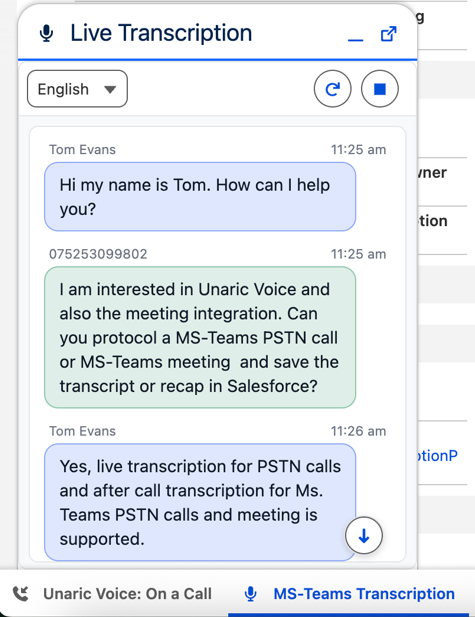
See: Live Transcription of MS Teams calls
See configuration: Live Transcription
MS Teams Add-In: Search and call Salesforce records
Users can now directly start calls by searching Salesforce-Contacts, -Accounts, -Leads, -Users, or Office 365 contacts.
After typing a name and clicking the search icon, matching records appear, and the call can be started by selecting the desired phone number.
See: Outbound Calls Unaric Voice Add-In
MS Teams Add-In: Line selection for outbound calls
Outbound calls now support selecting which phone number is shown to the call recipient (queues, main numbers, direct extensions).
See: Outbound Calls Unaric Voice Add-In
MS Teams Add-In: Call type based tasks
Call type based task creation is now supported, allowing Salesforce tasks to be generated automatically depending on the type of call.
See: Unaric Voice Add-In Configuration
MS Teams Add-In: New features in the history details
•The related Salesforce record can now be opened directly from the history detail view.
•New outbound caller ID selection with instant call initiation.
•Ability to create a new Salesforce Contact or Lead directly from the call history.
•Option to create a new Salesforce Case right from the history panel.
See: History Unaric Voice Add-In
Web meeting smarter logic for creating contacts
Improved Salesforce search logic now intelligently links new event attendees to the correct accounts while preventing duplicate or unnecessary contact creation. Using domain-based matching and an updatable public email domain list, the system ensures more accurate, automated associations and cleaner CRM data.
See: Manage public email domains
Exclude MS Teams Meetings by Category
It is now possible to define meeting categories that should not be saved in Salesforce. If a Microsoft Teams meeting contains one of these categories, the Unaric Cloud Service automatically excludes it from processing, keeping Salesforce free of unwanted or sensitive meeting records.
See: Meeting recording details
See configuration: Call Center - Tenant Setup
License Assignment Improvements
Admins can now quickly search users, filter unassigned users, and allocate product licenses more efficiently, supported by a clear overview of all available and used licenses.
See: Add or Remove users to a Call Center Configuration
Prevent Duplicate Office 365 Email Assignments
A new validation prevents multiple Salesforce users from using the same Office 365 email address. If a duplicate email is detected, the system now shows the message "This Office 365 E-Mail address is already in use by another user". This ensures clean user data and avoids login or configuration conflicts across the softphone and Teams Add-In.
Install Update

