
All-In-One Protector 8
The Premium Plus or Multi-Platform Edition comes with a ready to go installation manager. It allows installing the files from CD or download link to the hard disk. It also offers a network installation for Client PC's. The installer files can be found on the folder \All-In-One Protector\8\installer .
The installation manager includes the following features:
•Copies all files to a specified directory •Displays a license agreement •Adds the necessary user rights to the specified directory •Copies the player, database (.aipfile) file and the license file to the specified directory, including an icon file •Adds a program manager group and an entry within the program manager group to start the All-In-One Player •Define a different start application, e.g. a menu program •Copy additional files, e.g. files needed by a menu program •Display a readme file at the end of the installation •Option to install the files on a USB flash drive instead of the hard disk •Adds uninstall information •Installation dialogs are available in multiple languages |
|
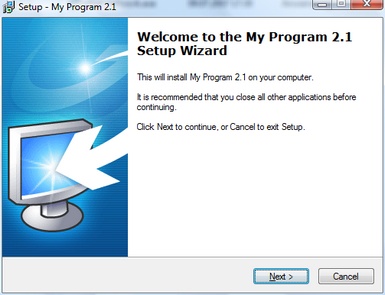
 You can change the icon on the desktop and in the program manager group with an own bespoke icon.
The installer consists of 2 files:
•setup.exe - (installer file for single user installation) or setup-sign.exe (digitally signed with Mirage credentials)
•setup.ini - (configuration file for installer)
Copy these 2 files from the main installation folder ..\All-In-One Protector Premium Plus\8\installer to a new folder, eg. Master CD
•Publish the project with the option for CD
•Copy the files from the folder - Publish All Media - to the new Master CD folder
•Then modify the setup.ini file with any editor. The name of the installer can be renamed, e.g. to setup-abc.exe. The name of the ini file must be setup.ini.
If you want to start the installer directly after a CD is inserted, modify the file autorun.inf.
[autorun]
icon=flash-demo.exe
open=setup.exe
Name=All-In-One Protector - Flash Demo
 This feature requires the All-In-One Protector Premium Plus or Multi-Platform Edition.

This option is not available
•All files of the installation manager can be delivered as a self extracting EXE file
•You should sign the installer and application.
See also
Configuration File - Setup.ini
Single User Installation
Network Installation

