
Unaric Voice
Configuration for recordings and transcriptions in MS-Teams Meeting and MS-Teams - Voice Call.
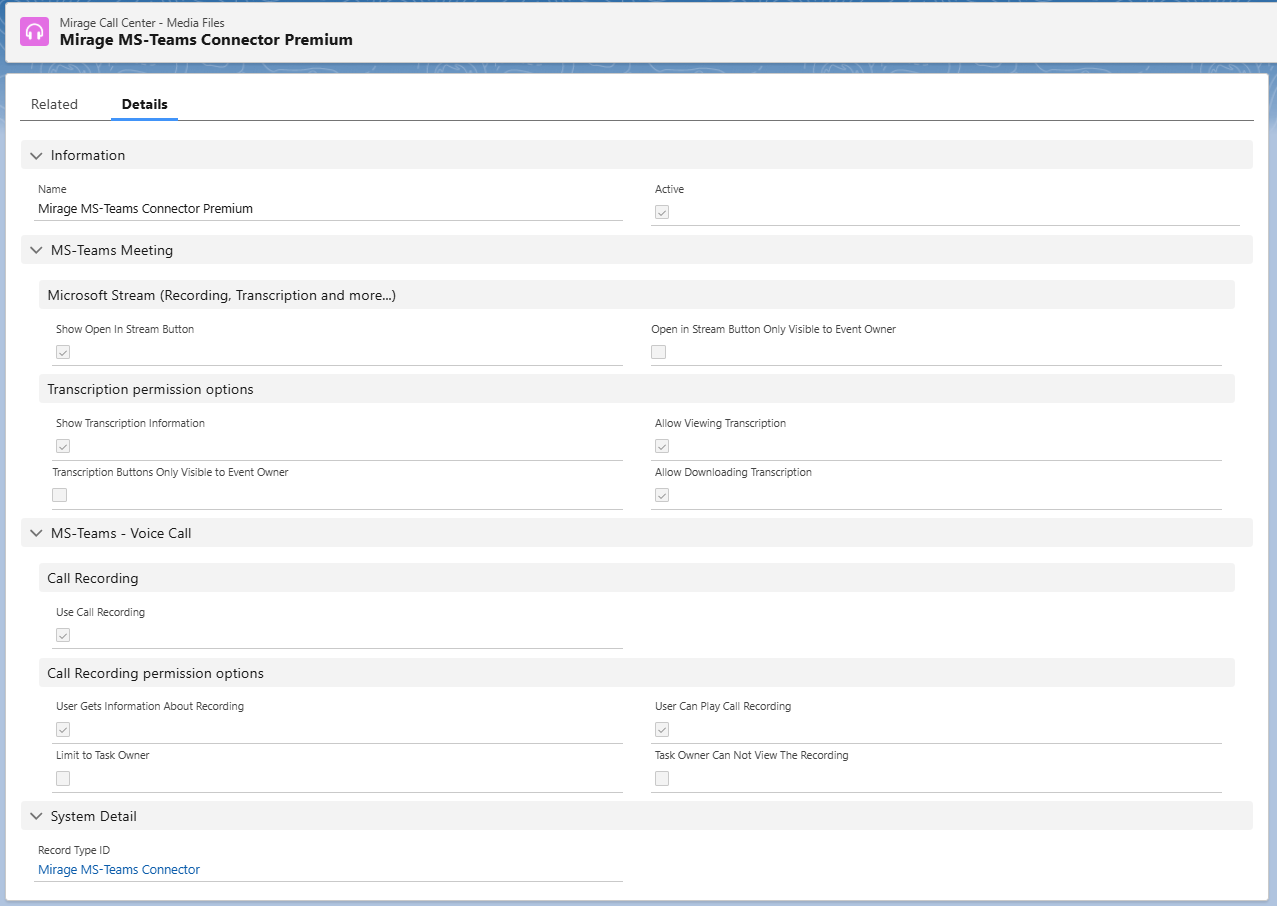
Information
Name
Internal name of the configuration. Typically used for identifying different MS Teams connector setups (e.g. "Mirage MS-Teams Connector Premium").
Active
Enables or disables this configuration. Must be checked for the settings to be applied.
MS-Teams Meeting
Microsoft Stream (Recording, Transcription and more...)
Show Open In Stream Button
Shows a button on the event page that links directly to the MS Stream recording of the meeting.
Open in Stream Button Only Visible to Event Owner
If enabled, only the user who created the event can see the "Open in Stream" button.
Account/Contact Owner Can Access Recording
If enabled, the account or contact owner is allowed to access the meeting recording.
Transcription Permission Options
Show Transcription Information
Displays transcript-related info (e.g. summary or transcript file link) on the event page.
Allow Downloading Transcription
Enables users to download the transcript file from Salesforce.
Transcription Buttons Only Visible to Event Owner
If checked, transcription-related buttons are only visible to the owner of the Salesforce event.
Allow Viewing Transcription
Users are allowed to view the meeting transcription in Salesforce.
Transcription Buttons Only Visible to Event Owner
If checked, transcription-related buttons will only be shown to the owner of the Salesforce event.
Account/Contact Owner Can Access Transcription
If enabled, the account or contact owner is allowed to access the meeting transcritpion.
MS-Teams – Voice Call (Azure)
Call Recording
Use Call Transcritpion
Enables or disables transcription for MS Teams voice calls and shows the following settings.
Select Transcription Type
Defines the transcription mode to be used:
•Live Call Transcription
•Post Call Transcription
Transcription Service Url
The URL of the Azure-based transcription service.
ACS Speech to Text Details
AI Foundry Speech Services Region
Specifies the Azure region in which the speech service operates (e.g., “Germany West Central”).
AI Foundry Speech Services Key
API key used to authenticate with the Azure Speech Service.
Default Transcription Language
Sets the default transcription language (e.g., “German”, “English”).
Save Call Transcription
Save Call Transcription in Salesforce
Enables saving the completed call transcription in a Salesforce Task record after the call ends.
Configuration for Saving Call Transcription
Select the Recording/Transcription configuration that defines how call transcriptions should be stored in Salesforce (for example “MS-Teams – Voice Call Save Recording/Transcription”).
Call Transcription Permission Options
Limit to Task Owner
If enabled, only the owner of the Salesforce Task may access the transcription.
Account/Contact Owner Can Access Transcription
Allows account or contact owners to view the transcription.
Allow Viewing Transcription
Grants permission to view the transcription.
System Detail
Record Type ID
Indicates the record type for this configuration.
Clicking on the linked text (e.g. Mirage MS-Teams Connector) leads to the corresponding record type definition.

