|
|


Upload Configuration Files |

|

|

|

|
||
|
Upload Configuration Files |
|
|
|

|

|
Upload Configuration Files
|
|
|
Upload Configuration Files |
|
|
|
|
||
|
Upload Configuration Files |
|
|
|
|
|
You have to copy your files to the Activation Server with an FTP software (using the File Explorer will not work).
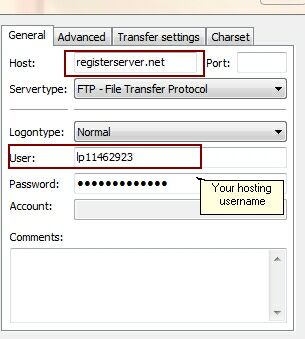
Using the popular FTP Tool FileZilla Client (http://filezilla-project.org/) the settings would be as follows:
The user name always starts with lp + number.
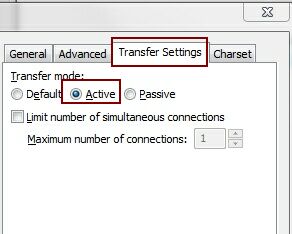
It is important to set the transfer mode to Active
Select the folder \alg and copy to this file:
| • | Your project template. This has to be done every time when you - change the PSK - change a module type - add a new module |
| • | Your workflow file config-workflow-xy.xml |
Select the folder \pconfig and copy the project.config file there
You have to restart the Activation Server after making configuration changes.