|
|


Outgoing Calls |

|

|

|

|
|
Outgoing Calls |
|
|
|

|
|
|
Outgoing Calls |
|
|
|
|
|
Outgoing Calls |
|
|
|
|
|
|
||
CTI Connector provides multiple options to make an outgoing call dependent on the application your are using. The option Dial with an Hotkey should work in any application.
All available options are:
•Dial using the Phone book
•Dial using a Hotkey
•Dial within the Browser
•Dial with a Hyperlink
•Dial using the Clipboard
•Redial using the last called phone number
•Dial using a Phone Pad
•Dial using Call History List (incoming and outgoing calls)
•Dial using the telephone set - the dialled address will be displayed
By default, the icon is not visible on Vista and Windows 7 in the notification area. To show the icon  for CTI Connector in the system tray, click on the up arrow. Click on Customize.
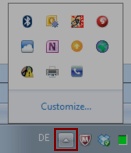
This will open the Notification Area Icons control panel item. Select the icon for CTI Connector and in the pick list select: Show icon and notification.

