|
|


Icon always visible |

|

|

|

|
|
Icon always visible |
|
|
|

|
|
|
Icon always visible |
|
|
|
|
|
Icon always visible |
|
|
|
|
|
|
||
By default, the icon is not visible on Vista and Windows 7 in the notification area. To show the icon  for CTI Connector in the system tray, click on the up arrow. Click on Customize.
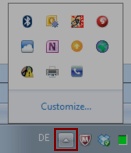
This will open the Notification Area Icons control panel item. Select the icon for CTI Connector and in the pick list select: Show icon and notification.

