Navigation: »No topics above this level«
Configuration for Special System Environments


|
Navigation: »No topics above this level« Configuration for Special System Environments |
|
Here you can define special system environments for CTI Data Connector Office Edition. This is necessary when another application cannot directly communicate with CTI Data Connector Office Edition, because it is running on a Terminal server or in another window (e.g. an application for IBM iSeries).
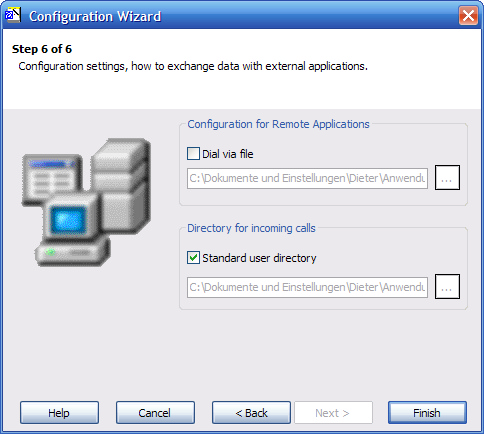
Configuration for Remote Applications
If Dial via File is selected, CTI Data Connector Office Edition will dial automatically when the file dial.xml is available on the selected directory. Within the file, the phone number to be dialled has to be available. The file must have the following format:
<CDC>
<DialPhoneNumber>PHONENUMBER</DialPhoneNumber>
</CDC>
Directory for incoming calls
CTI Data Connector Office Edition can provide the call information in the file cdcoecalls.XML for other applications. Normally, this file is created in the user specific directory, but another directory (even on a server) can be defined.
Page url: http://www.helpserver.biz/onlinehelp/cdc/oe/2.3/help2000/index.html?wizard___step6.htm